Piano Trainer: a piano teacher in the browser that listens while you play
A falling-notes piano app with a 48-day spoken course. It hears a real piano through a cable or a microphone, keeps you on each exercise until it's 100% right, and steps in when you're struggling.
What it is
I’m relearning the piano after 25 years away from it. Piano Trainer is the teacher I built for that. It runs in a web browser with no account and nothing to install: try it at piano.jlwhite.ca, or open it straight from a folder of files, offline.
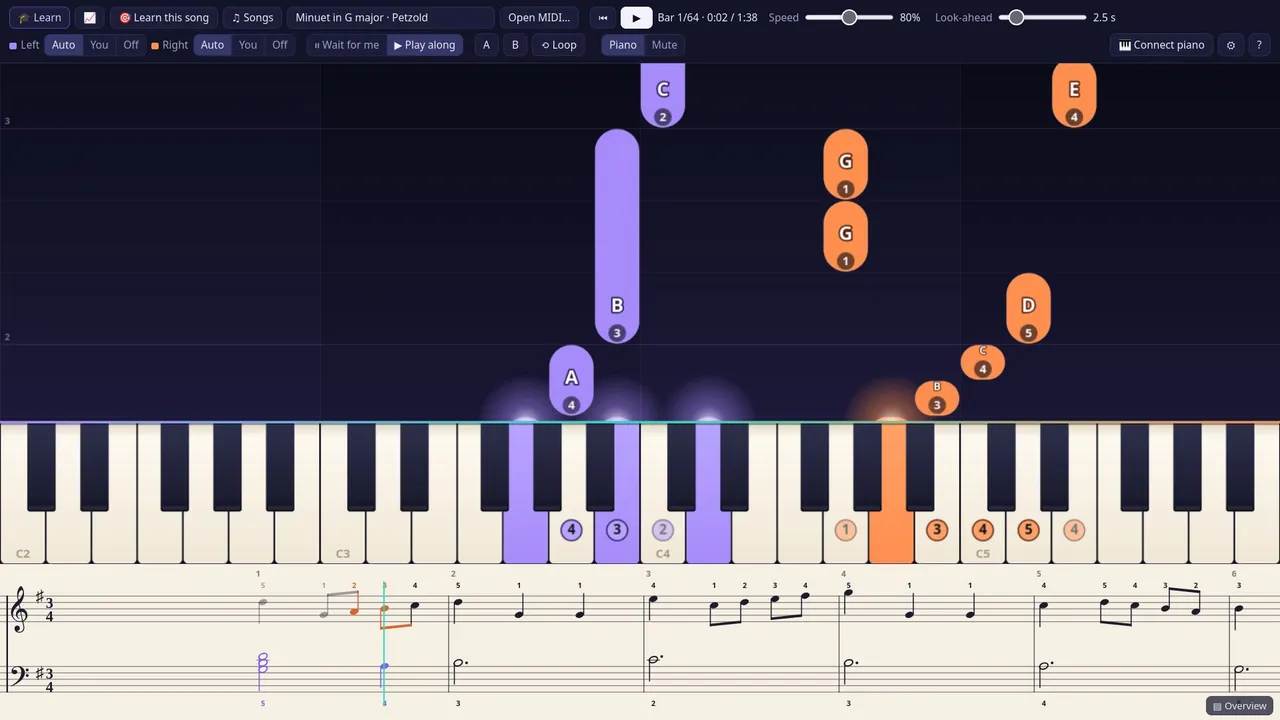
Notes fall onto an on-screen keyboard: orange for the right hand, violet for the left, with a finger number on each. You can slow a song down to 10% without the pitch changing, loop the bars you keep missing, or have it wait at each of your notes until you play them. The strip along the bottom flips to real sheet music that scrolls with the song, so you practise reading while you play.
The tour above was made by the app itself. A script drives it headless one frame at a time, narrates in the same voice as the teacher, and renders the piano from the app’s own samples.
Getting started
The first time you open it, a short welcome tour appears straight away. It asks how your piano is connected, checks that it can hear you by having you play middle C, puts a spotlight on each part of the screen while the teacher explains it, and then takes you straight into the course or into the song library.
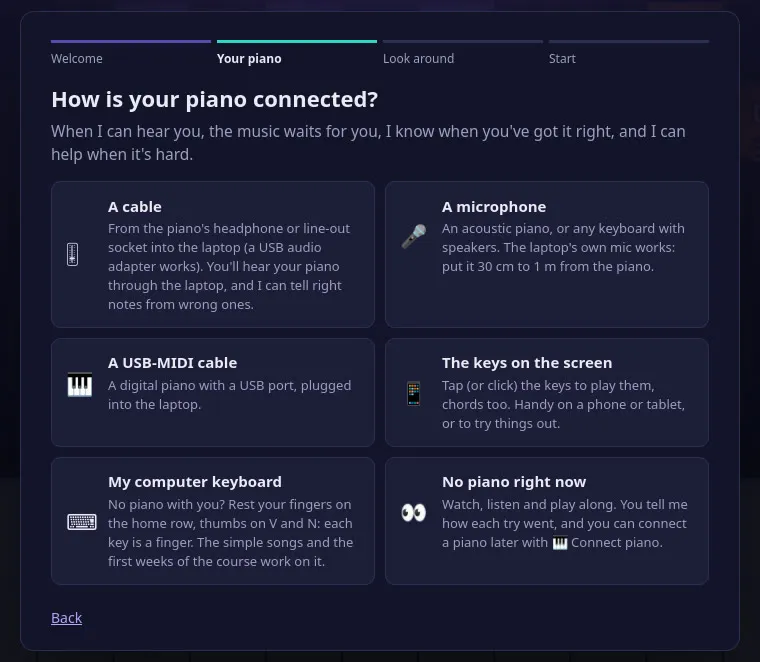
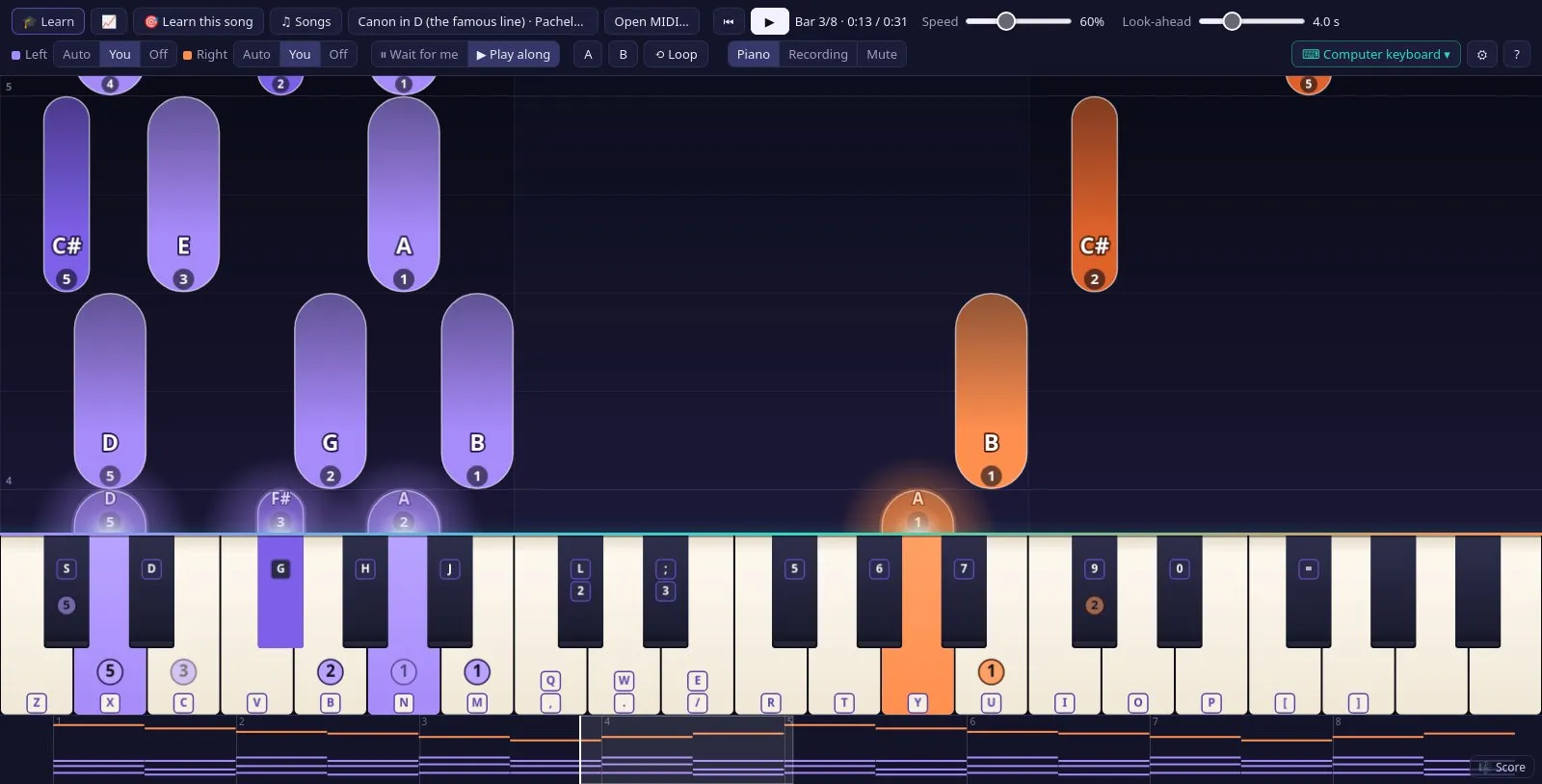
No piano to hand? The computer keyboard works too, two ways. For the early lessons the home row becomes two hands in a five-finger position, thumbs on V and N, and each key is a finger, so you learn the fingering as you go. For everything else, two rows become two and a half octaves of a piano, the layout music programs use: Z to / and Q to ] are the white keys, and the row above each has the black keys. The rows sit where the song is, Page Up and Page Down move them, and a note beyond them is played by its key an octave away. By default it switches between the two by itself, so the whole course and every song in the library can be played from a laptop.
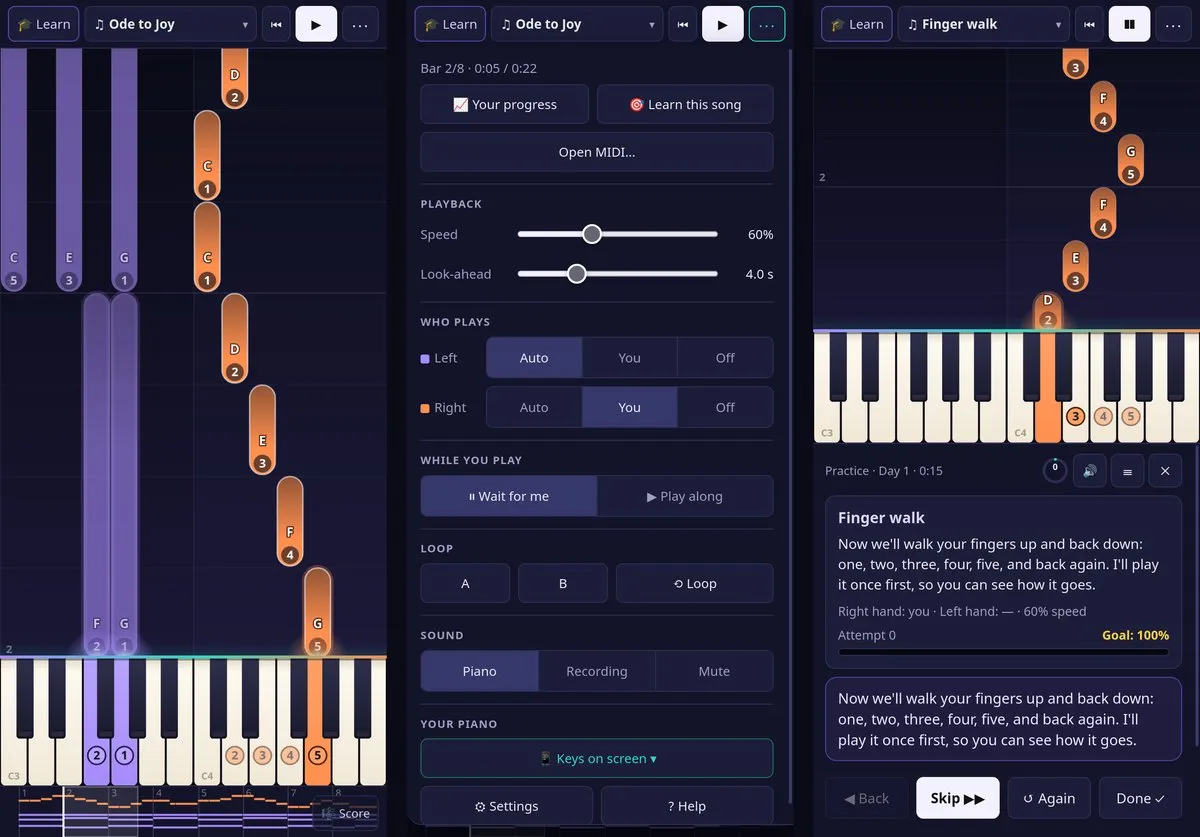
It works on a phone or a tablet too. On a small screen the toolbar is one row with the song’s name, and the rest of the controls sit in a ⋯ panel, grouped and sized for a finger. The teacher’s panel moves under the notes (or beside them, with the phone on its side) and keeps Next within reach of your thumb, and the keyboard narrows to the hand you’re playing so the keys are big enough to tap. The keys on the screen can be the piano, with chords and a finger sliding across the keys, or the phone’s own microphone can listen from the piano’s music stand. Added to the home screen, it opens full screen like an app, and the screen stays on while you play.
A teacher that listens
What makes it more than a player is that it hears you. My digital piano’s headphone output runs by cable into the laptop’s audio input; an acoustic piano works through a microphone, and a USB/MIDI keyboard works in browsers that support Web MIDI.
Naming a single note is a solved problem, and the detector uses the YIN method for it. Chords are harder, because a piano note is a stack of overtones and in a chord they land on each other:
- An E4 followed by an E5 shares every partial, so the leap up is recognised by the pitch moving during the attack while the lower note’s own partials don’t get louder.
- A G and the D above it can read as a G an octave lower, the “virtual” pitch of the pair. A note only counts if it stands out from the semitones either side of it and got clearly louder right after the attack.
- Two low notes a third apart beat against each other fast enough to look like a string of new attacks, so each attack is measured against the average of the last few moments rather than their quietest point.
- The detector’s idea of the room’s background rises only about 10 dB a minute, so a long passage without gaps is never mistaken for noise.
- Playing along, the notes around the moment you play are judged one chord or note at a time, nearest first. Judged together, a melody’s notes still ringing or still to come, and the other hand’s, kept a chord from ever being complete, or passed for notes of it, so notes were missed or counted before they were played.
It’s tested the way it’s used. One harness plays every exercise in the course correctly, through the app’s own piano samples and a simulated cable input, and fails if a single correct note is marked wrong or missed. Another feeds the detector rendered piano with room noise at the level measured on the real input, including cases that must not count: a wrong note, a chord with a note missing, the wrong chord. It earned its keep: one detector speed-up that looked harmless started losing notes in a Für Elise exercise, and the harness caught it. A third plays pieces with both hands into the real player on a clock of its own, playing along and in wait mode, and fails if a note is missed, marked wrong or counted before it sounds.
There are honest limits. A microphone can’t always tell a wrong note from the room, so on a mic only right notes are counted; judging wrong notes needs the cable or MIDI. And a key played an octave off counts as right, by design. Some passages are still hard to hear: notes less than about 0.12 s apart, an octave leap up from a bass note that’s still sounding, and chords doubled at the octave.
The course
The course is 48 days over eight weeks, about 38 hours in all, from finding middle C to Bach’s Prelude in C, Für Elise and a graduation recital. Every day has the shape of a lesson with a real teacher: a warm-up, a review of earlier exercises that are due again, something new, a piece, sight-reading of short tunes you’ve never seen, a game, and a finale to play along with. The last day of each week is a recital.
The rule is that it keeps you on an exercise until you get it 100%, and it notices when you’re struggling. A miss doesn’t just get “again”. The help escalates:
- Which bar was the tricky one.
- A bit slower, or the music waits for you.
- Just the tricky bars, until they’re right twice running.
- Hands separately, then together again.
- Slower still, and after a few tries a suggested break and a “skip for now” that brings the exercise back in a later review.
Reviews are spaced out at 1, 2, 4, 8 and 16 days, and anything that needed help comes back sooner. Between the work there are games (find the note, play back a tune by ear, tap a rhythm, name that chord), and around it all there’s XP, levels from Newcomer to Maestro, 39 badges, a daily goal and a streak. In play-along mode each note gets a timing grade, combos multiply the score, and a song earns one to three stars.
The teacher talks. Every line is pre-recorded with the Kokoro text-to-speech model running locally, because the browser’s built-in speech sounds robotic on Linux, and every clip is transcribed back with Whisper to check it says what the script says. Learn this song does the same for any song in the library or any MIDI file you open: it splits the piece into sections of a few bars and teaches each one right hand, left hand, then together.
Every note from a score
The library holds 96 songs: 17 beginner tunes, 50 well-known classical pieces from Petzold’s Minuet in G to Liszt’s La Campanella, and a shelf of game and film music. The classical pieces come from published public-domain and Creative Commons score editions, never from recordings. 49 are compiled from the Mutopia Project’s LilyPond sources with the repeats written out, and La Campanella comes from the ASAP dataset. Each note goes to the hand whose staff it’s printed on, unless that hand can’t reach it. Where a second, independent edition exists, the two were compared bar by bar: 19 songs have that check, and they agree 93.5–100%, the gaps being ornaments, grace notes and first-edition variants.
The game and film shelf is public-domain music with a famous second life: Korobeiniki (Tetris’s Theme A), Bach’s Toccata and Fugue in D minor (the arcade game Gyruss), the whole of the Blue Danube waltz as it plays in 2001: A Space Odyssey (from a CC0 arrangement), and 16 originals written for the app in the style of 8- and 16-bit console music. Copyrighted soundtracks aren’t in it. For those you open your own MIDI file: the app puts the tune in the right hand and the bass in the left, leaves the drums out, and keeps the song in your browser. Every score-based song names its source edition and licence.
Built for an ordinary laptop
It runs online or from a local file, in Firefox, Chrome or Edge. The keyboard and note shapes are drawn once and reused, the picture is redrawn only while something moves, the graphics switch to a lighter look on their own if frames start taking too long, and the note detector costs about 35 ms of computing per second of sound. Songs without fingering in their score get a suggested fingering, worked out as the cheapest path for a hand through the notes: stretches, crossings, the thumb on a black key.
Closing
Most of the engineering went into one question: did the person at the piano just play the right notes? Everything else, from the course to the games to the stars, depends on answering that honestly, which means never calling a right note wrong and never letting a wrong one through.